365id & Hotsoft

Hotsoft Logo black

The integration between 365id and HotSoft PMS helps hotels simplify guest check-in. Guest ID documents are scanned and verified in seconds, with the data transferred directly into HotSoft PMS, reducing manual work and creating a faster, smoother check-in experience.

About Hotsoft

HotSoft is a Property Management System (PMS) designed to support hotels in their daily operations. The platform helps hotel teams manage reservations, guest information, check-ins and other key processes in one system.

With the 365id Scanner integrated to HotSoft, hotels can add fast and secure ID verification to their existing workflow. Guest information is captured from the ID document and transferred directly into the reservation, reducing manual data entry and making the check-in process easier for both staff and guests.

Why integrate with 365id?

With an ID verification solution from 365id, the correct customer information is transferred quickly, easily, and securely to your existing business system for further processing.

  • Validate authenticity passports, ID cards & drivers licenses
  • Faster customer process
  • Improved customer experience
  • Secure customer onboarding
Gain richer data, deliver a smoother customer experience – all while going paperless for a more eco-friendly journey.
We are committed to compliance with all relevant local legislations and GDPR in respect of personal data.
Reduce costs significantly compared to manual paper processes – save on storage, lower chargeback risks, and minimize theft and fraud through secure ID verification.
The 365id Scanner is easy to get started with, just plug and scan. The only need is internet and power.

Hotsoft & 365id Integration

Data captured from identity documents

When scanning passports or national ID cards, the following information can be automatically extracted and stored in the guest profile:

Supported fields

Personal details

  • First name
  • Last name
  • Gender
  • Date of birth

Address information

  • Address
  • County
  • City
  • Postal/ZIP Code
  • State/Region
  • Country

Document Details

  • Document Type
  • Passport Number
  • Issue Date
  • Expiration Date
  • Issuing Country

Additional Options

  • Optional storage of document images in the 365id Portal. 

365id Hotsoft Integration

Connecting 365id to Hotsoft for the first time:

  1. Contact either Hotsofts Account Manager or your Planet Support team
  2. Request the Open API Integration for 365ID

Once the installation has been completed, we will setup the connection between our system and the customer with help from the Planet team.

1. Scan the document in the 365id Scanner.

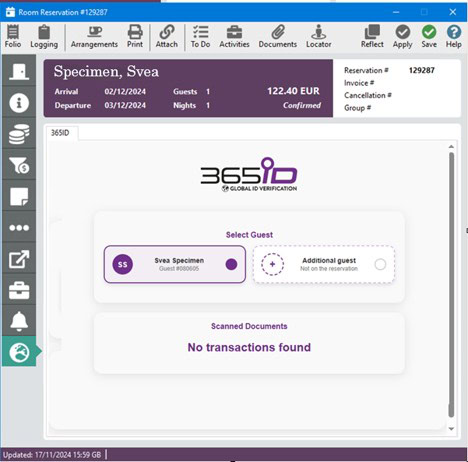
2. Click the “365ID” tab and the current guest is presented:

Steg 1

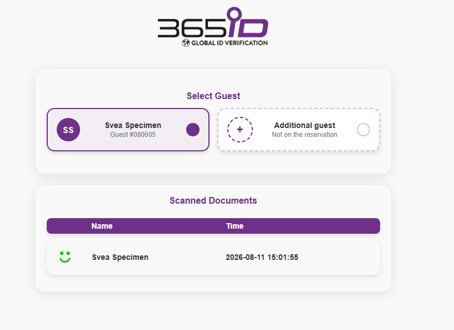
3. When the document is scanned it appears in the Scanned Documents section:

Steg 2 Hotsoft

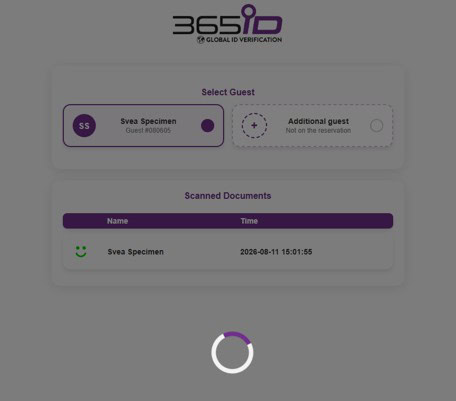
4. Click the guest that you want to update in the Select Guest section. Click on the scanned document in the Scanned Documents section:

Steg 3 Hotsoft

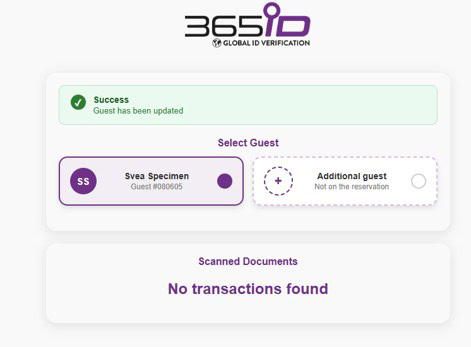
5. The data from the document is transferred into the reservation and the guest is updated:

Additional guests staying in the same room can also be added.

Steg 4 Hotsoft

This is handled by the Planet team.

To contact 365id email our 24/7 support at support@365id.com

FAQ

Yes,  our cloud based 365id scanners can be used at multiple check in counters/desks, depending on your hotel’s needs. 

365id supports passports, identity cards,  and driver’s licenses, from all the countries around the world.  

After the document is scanned and verified, the guest’s information is securely sent to Hotsoft PMS in real time, reducing manual data entry.

You’ll need a 365id Scanner, an internet connection, and access to your Hotsoft PMS. 

Yes, 365id is fully compliant with GDPR and other data privacy regulations. All scanned data is handled securely.

For assistance, contact the 365id support team via support@365id.com

Contact us

Porträtt Marcus Mellberg 365id

Marcus Mellberg,
Sales Manager

I will be more than happy to assist you if you have any questions or other enquiries. Contact me through the form or use the contact info below.

marcus.mellberg@365id.com
+46 10-12 21 915